Today we’re releasing Flatsome Site Builder 1.0. It’s the biggest change in Flatsome’s history: we rebuilt Flatsome from the ground up on WordPress blocks.
Our goal is simple. Flatsome should be the best way to run an online store or business together with AI agents, while you keep full visual control and every change stays safe.
This post covers why we made the move, what you get, and what it means if you use Flatsome Classic today. If you only have a minute:
- Your AI assistant can build and edit your site, and you decide what goes live.
- Pages are built from WordPress blocks, so they load faster and stay readable without Flatsome.
- Flatsome Classic is still fully supported. Moving is optional.
- Bought Classic on ThemeForest? You get $20 off the 1 site plan.
Ready for the agentic era
Blocks are what make AI agents genuinely useful. A page in Site Builder isn’t a wall of markup. It’s a tree of blocks with clear settings, the same blocks you use in the Builder. That gives an assistant something it can read, change and check.
Site Builder includes a built-in MCP server, so assistants like Claude, ChatGPT, Grok and Cursor can connect to your site in a few minutes. Ask for a new landing page, a seasonal sale or better product descriptions, and watch it happen. Open Builder tabs refresh as the agent works, so you can step in at any point.
No AI subscription from us is needed: bring the assistant you already use.
What your assistant can do
Almost anything you can do in the Builder. It can:
- Build and edit pages, posts, templates and menus
- Restyle the whole site in Global Styles
- Manage deals, delivery windows, quantity rules and swatches
- Build forms and go through the entries
- Upload images and write alt text
- Set SEO titles, descriptions and social images
Setup takes a few minutes. See Connect an AI assistant.
Why it’s safe
Letting an AI edit your store shouldn’t feel like a gamble. New posts start as drafts, and every change is saved as a revision you can restore. Each edit is checked against the block definitions before it’s saved, and an agent changes one block at a time instead of rewriting a whole page.
You also decide how much an assistant may do. New connections start read-only, you widen access per connection, and every action is logged.
Why we moved beyond shortcodes
In Flatsome Classic, pages are saved in Flatsome’s own shortcode format. Switch the theme off and those pages turn into lines of shortcode text. Site-wide styles live in the Customizer, on a different screen from UX Builder. The builder, the theme and your content were tied together in ways that were hard to change.
So rather than extend the shortcode system one more time, we rebuilt Flatsome on the same block foundation WordPress itself uses. The biggest reason is speed. WordPress renders blocks faster than shortcodes, and each block loads its styles only on the pages that use it.
In a lab test of one WooCommerce store moved from Classic to Site Builder, the home page on a phone showed its first slide in 3.2 s instead of 6.0 s. Lighthouse 13, median of 7 runs. Results vary by site.
Blocks also make your content more portable. Site Builder saves standard WordPress blocks, so your pages open in the block editor too, and headings, text and buttons stay readable even without Flatsome.
It isn’t just the WordPress block editor, though. Flatsome has its own editor, the Builder, with a live canvas, layers and Global Styles.
Two parts that work together
The Flatsome Block Theme holds your design system and templates: colors, fonts and spacing, plus the header, footer, shop and product pages. The Flatsome Site Builder plugin adds the Builder, 100+ blocks, the pattern library, the WooCommerce features and the MCP server. Install the plugin and its setup wizard takes care of the theme.
What’s in Site Builder
Everything in Site Builder is a block, from a button to a header to a product card. Here’s what that makes possible.
Design every part of your site
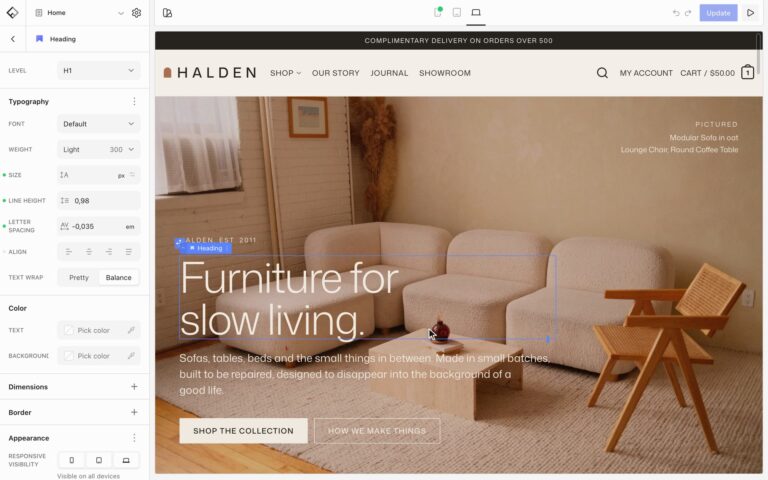
The Builder edits pages, posts, headers, footers and shop templates in one place. You get 100+ blocks, from sliders, tabs and accordions to mega menus, marquees and countdowns, plus 150+ patterns and 16 starter sites to begin from.
Every block has the same controls: responsive spacing, typography and colors, hover effects, sticky positioning, scroll animations, and display conditions that show a block only to the right visitors or on the right products.
Headers, footers and templates are edited the same way as pages.
Style it once
Global Styles sets colors, fonts and the default look of every block across the site, down to tabs, navigation, drawers and dropdowns. Change your brand color once and it updates everywhere. Patterns in the Design Library even preview with your own styles before you insert them.
Change a color or font once in Global Styles, and every page follows.
Sell with WooCommerce
Product grids, galleries, swatches, quick view, the mini cart and wishlists are all blocks, and one product card design is shared across the shop and related products. Dynamic Pricing handles sales, quantity discounts and buy X get Y deals. Quantity Rules, Estimated Delivery and Catalog Mode cover the rest.
Quantity discounts, bundles and sales show right on the product.
Run the rest of your site
Forms are built in the Builder, and entries are stored on your own site. SEO covers title templates, social previews, structured data and sitemaps. Age Gate, Cookie Notice and maintenance mode are modules you switch on when you need them.
Build forms on the page you’re editing. Entries stay on your own site.
What this means for Flatsome Classic
If you’ve used Flatsome for years, you know Flatsome Classic (Flatsome 3). It has served a lot of shops well, and it isn’t going anywhere.
Classic remains fully supported. It keeps getting updates for new versions of WordPress and WooCommerce, including security fixes, and no end date is planned. Site Builder is a separate product with its own license, so nothing changes on your Classic sites.
You don’t need to move. If you want to, you can do it in your own time. Today a site runs either Classic or Site Builder, but we plan to make Site Builder usable inside Classic, so you can adopt blocks gradually. We don’t have a date to share yet.
Moving from Classic, if you want to
The Flatsome Migrator plugin does the heavy lifting. It scans your site and converts pages, posts and products built with UX Builder into blocks, along with headers, footers, menus, widgets, theme settings and fonts.
Nothing changes on your live site until you apply the migration. You preview and review every converted page first, and a connected assistant can compare the original and converted pages for you. If something isn’t right afterwards, the Migrator can restore your original site.
Some things have no block equivalent yet, and the Migrator tells you instead of guessing. Here’s what moves for you, and what to check by hand:
Moved for you
- Pages, posts and products built with UX Builder
- Headers, footers, menus and mega menus
- Theme colors, settings and Google Fonts
- Sidebar widgets and page templates
- Contact Form 7 forms, with their styling
Check by hand
- Classic shortcodes with no block, like Portfolio
- WPML language shortcodes
- Child theme code and templates
- Per-category product layouts
- Your most important pages, for SEO
The scan lists each one, so nothing is a surprise. Full list
Take a backup, try it on a staging copy first, and follow the migration guide for the full checklist.
Good to know before you start
Requirements
WordPress 7.1+, PHP 8.2+, WooCommerce 11.0+, MySQL 8.0+ or MariaDB 10.6+, HTTPS. Server recommendations
Installing
Install the Site Builder plugin. Its setup wizard installs the Flatsome Block Theme for you. Installation
License
1 site, or plans for 10 or 100. Each live site includes a staging site. Local and development sites are free. Pricing
Updates
A year of updates and support. After that, your site keeps working on the version it has.
Classic buyers
$20 off the 1 site plan when you sign in with your Envato account. Envato discount
What’s next
Site Builder is the foundation. You can build your site yourself, let an assistant do it, or work on it together, with drafts, checks and revisions keeping it safe. For Classic users, the next big step is bringing blocks into Classic.
Thank you to everyone who tried the betas and release candidates and sent us feedback. Site Builder is better because of you.
Ready to start? Read the installation guide, connect your AI assistant, or compare Classic and Site Builder side by side.