The Video block plays a YouTube or Vimeo video, or your own MP4 or WebM file. Videos load only when they come near the screen, so they don’t slow down the rest of the page.
Add a video
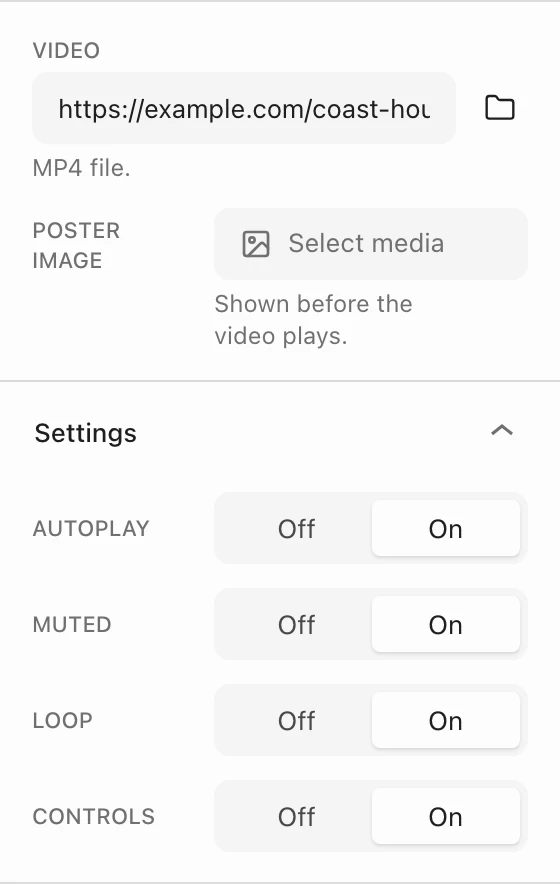
Insert the Video block and paste a YouTube or Vimeo link into the Video field, or choose the folder button to pick a file. Link parameters such as the start time carry over.
Settings
- Autoplay, Muted, Loop, and Controls are all on by default. Browsers only autoplay muted videos.
- Poster image (video files only): shown before the video plays. Use it for a still that matches the first frame.
Loading and playback
- Video files load and start when they come near the screen, pause when scrolled away, and continue when visitors scroll back.
- YouTube and Vimeo players load once part of the player is visible. A video the visitor paused stays paused.
- Visitors who ask their device to reduce motion see autoplaying video files paused on the first frame, with controls to play them.
Extend beyond the column
Like the Image block, the Video block can reach past its column with Outset in the Dimensions panel. See Image. For a video behind a banner or section, see Add a video background to a banner.